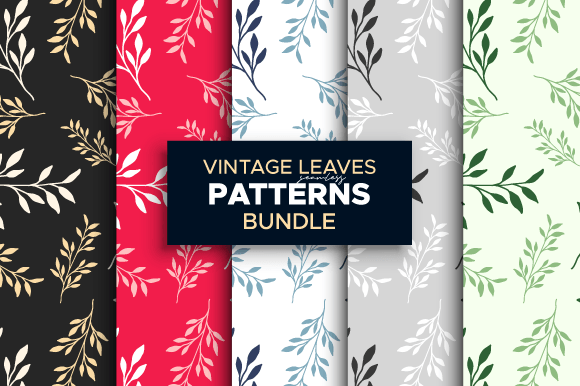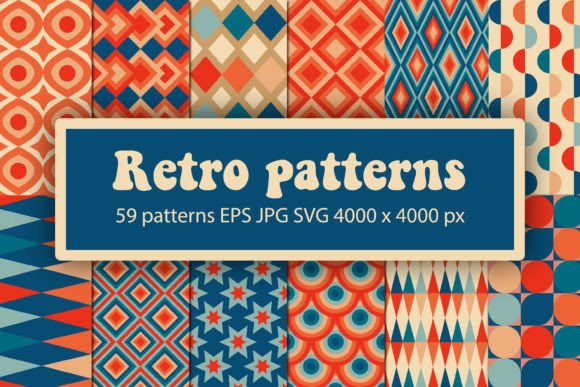
Vintage Retro Seamless Patterns
Seamless patterns rooted in vintage and retro aesthetics aren’t just decorative—they’re functional assets that accelerate design decisions, reinforce brand continuity, and reduce production friction. Vintage Retro Seamless Patterns is a curated collection built for real-world application: from early-stage concepting to final print delivery. It bridges the gap between nostalgic visual language and modern technical requirements—without sacrificing fidelity, flexibility, or workflow compatibility.
Where This Collection Fits in Your Creative Process
Unlike standalone illustrations or one-off graphics, seamless patterns serve as foundational layers. You’ll use them before finalizing layouts (to test color harmony and scale), during production (to populate mockups or generate repeatable textile swatches), and after approval (to export consistent assets across packaging, stationery, and digital touchpoints). Because each pattern tiles perfectly edge-to-edge, you avoid manual alignment, clipping, or pixel-level fixes—saving time at every stage.
For marketers launching a limited-edition product line, these patterns help establish immediate visual cohesion across email headers, Instagram carousels, and shelf-ready boxes—all from the same source file. For educators designing printable classroom resources, the high-resolution PNGs drop cleanly into Canva or Google Slides without transparency artifacts. For small business owners ordering custom wrapping paper or fabric labels, the 300 dpi JPG and EPS files meet printer specifications without upsampling or interpolation.
Compatibility Across Tools and Outputs
The included formats are selected not for breadth, but for purpose-driven interoperability:
- SVG files work natively in Cricut Design Space for cut-ready decals, iron-on transfers, or vinyl stencils—ideal for craft-based branding or event signage.
- EPS Version 10 ensures backward compatibility with older versions of Adobe Illustrator and CorelDRAW, supporting teams using legacy software without requiring upgrades or conversion steps.
- PNG files (4000 × 4000 px, 300 dpi, transparent background) integrate cleanly into Photoshop composites, Figma prototypes, and PowerPoint presentations where layering over photos or gradients is needed.
- JPG files (4000 × 4000 px, 300 dpi, white background) are optimized for direct upload to print-on-demand services like Printful or Gelato—no extra background removal required.
No format requires post-download editing to be usable. That means less time troubleshooting rasterization errors, embedded fonts, or missing color profiles—and more time focusing on messaging, audience resonance, and execution quality.
Practical Implementation Tips
Start with scale testing. Before committing to a full run of branded notebooks or tote bags, place one pattern tile at actual size (e.g., 6" × 6") on your screen and step back three feet. Does the rhythm hold? Do motifs read clearly at arm’s length? Vintage styling often relies on fine linework or subtle halftones—verify legibility in context, not just at 100% zoom.
Use folders intentionally. The downloaded ZIP contains four clearly labeled folders—SVG, EPS, PNG, JPG. Keep them separate. Don’t rename or merge files across formats. If you’re preparing assets for both web and print, pull from the PNG folder for digital mockups and the JPG folder for physical proofs. Mixing resolutions or backgrounds mid-project introduces inconsistencies that surface late—like mismatched contrast on a printed brochure versus its email counterpart.
Leverage tiling behavior deliberately. Seamless doesn’t mean invisible. Use the repeat interval to control emphasis: smaller repeats (under 4" square) create texture and depth; larger repeats (8"+) emphasize motif hierarchy and work better for large-format applications like wall decals or fabric yardage. Adjust tile size in your design software—not by scaling the entire image, but by modifying the pattern fill settings (e.g., “Pattern Options” in Illustrator or “Fill Layer” in Photoshop).
Integration Into Broader Workflows
Vintage Retro Seamless Patterns functions best when treated as part of an asset system—not a one-off download. Pair it with your existing color palette library (e.g., saved Swatch Groups in Illustrator), typography guide, and brand voice document. When updating packaging for a seasonal campaign, apply the same pattern across primary box wrap, inner tissue paper, and thank-you card—then adjust only the base color or overlay opacity to signal variation without losing coherence.
For freelancers managing multiple clients, store the ZIP in a master “Patterns & Textures” folder synced via Dropbox or OneDrive. Name subfolders by year and license type (e.g., “2024_Retro_Vintage_Patterns_Personal”). This prevents accidental reuse across client projects and simplifies audit trails if licensing questions arise later.
Bloggers and content creators can embed the PNGs directly into tutorials (“Here’s how I applied this pattern to a DIY gift tag in Procreate”) or use the SVGs in video overlays—no attribution required per standard license terms. Just ensure exports retain the original resolution; resizing down to 1200 px for social posts won’t degrade quality, but upscaling from a compressed preview will.
Long-Term Usability and Quality Control
All files are pre-validated for output integrity: no stray anchor points in EPS, no alpha-channel bleed in PNGs, no JPEG compression artifacts visible at 200% zoom. That consistency matters when revisiting a project six months later—whether refreshing a holiday mailer or reordering stock for a pop-up shop. You won’t need to hunt for “the right version” or re-rasterize from scratch.
Because the patterns are vector-based at origin (even the PNGs and JPGs derive from clean vector builds), they scale infinitely without loss. Need a 24" × 36" poster background? Open the SVG in Illustrator, expand the artboard, and re-export. Prefer a monochrome variant? Apply a duotone effect in Photoshop using the PNG—no need to request alternate versions.
Finally, keep your download organized beyond the initial unzip. Add metadata: include the date of download, intended use cases, and compatible software versions in a plain-text README inside the ZIP. This takes 90 seconds now—and saves 20 minutes later when you’re on deadline and need to confirm which EPS version supports your client’s outdated InDesign setup.
What You Get—and Why It Matters
One ZIP file. Four purpose-built folders. No subscriptions, no watermarks, no usage caps. What you receive isn’t raw素材—it’s production-ready infrastructure. The SVGs let you cut, weld, and contour with precision. The EPS gives you editable paths for last-minute tweaks. The PNGs deliver transparency without fuss. The JPGs ship straight to printers.
This isn’t about adding more files to your hard drive. It’s about removing decision fatigue around texture, reducing revision cycles caused by inconsistent tiling, and ensuring your retro aesthetic lands with intention—not approximation.
Subscribe to stay informed about new pattern releases—including seasonal variants, expanded colorways, and companion elements like retro borders or typographic flourishes. Feedback shapes what comes next: if you’ve used these on apparel labels or school newsletters, or hit a snag exporting for a specific platform, that input directly informs updates.
Thank you for visiting. Your work—whether launching a handmade brand, designing curriculum materials, or building a community newsletter—deserves tools that respect your time, standards, and creative goals. Vintage Retro Seamless Patterns is built for that.