Seamless Lines Vector Patterns
Seamless Lines Vector Patterns are precision-crafted, repeatable design assets built from clean vector paths—lines, curves, and geometric forms—that tile perfectly without visible seams. Unlike raster-based repeats, these patterns retain infinite scalability and crisp fidelity at any size, making them foundational tools for designers, product creators, and digital publishers who prioritize quality, flexibility, and efficiency.
They’re not decorative afterthoughts. They’re structural elements—part of the early planning layer in visual workflows. Whether you're laying out a website background, prepping a POD t-shirt collection, or designing custom nail wraps, Seamless Lines Vector Patterns serve as consistent, editable scaffolding. Their vector nature means you can adjust stroke weight, color, spacing, or orientation *after* purchase—without loss of resolution or fidelity.
Where They Fit in Your Creative Process
Think of Seamless Lines Vector Patterns as reusable infrastructure—not just “graphics,” but functional components that accelerate execution across phases:
- Before a project: Use them to define visual tone during mood board development or brand guideline drafting. A subtle diagonal line repeat signals modern minimalism; a tight concentric circle pattern conveys precision and rhythm. Selecting one early helps align typography, color palettes, and layout decisions.
- During production: Drop them directly into Adobe Illustrator, Affinity Designer, or Figma as swatches or symbols. Because they’re EPS, JPG, and PNG files—all at 300 DPI—they integrate cleanly into both vector and raster pipelines. For example, when designing a set of greeting cards, apply a seamless line pattern as a subtle border texture, then export each card with embedded vector data intact.
- After delivery: Reuse the same pattern across related assets—like matching business cards, email headers, and social media banners—to reinforce visual continuity. That consistency reduces cognitive load for your audience and strengthens recognition over time.
Real-World Use Cases Across Industries
These patterns aren’t limited to graphic design studios. Their adaptability makes them practical for professionals with divergent goals and constraints.
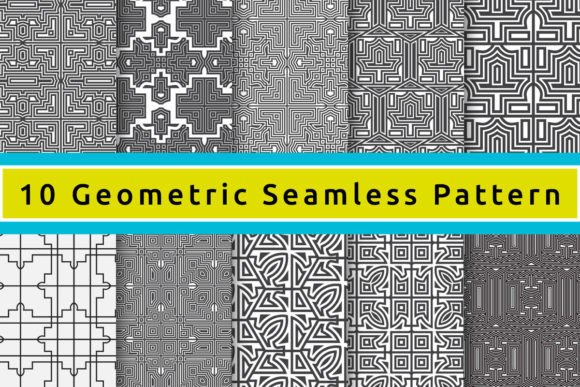
Product creators use Seamless Lines Vector Patterns on print-on-demand platforms. A single geometric repeat works equally well scaled to fit a phone case (tight crop), a tote bag (full bleed), or a ceramic mug wrap (curved distortion handled via vector path adjustment). Because the files include EPS (editable), JPG (preview-ready), and PNG (transparent background), there’s no need to convert or re-rasterize before upload—cutting prep time by up to 40%.
Educators and content publishers embed them into slide decks, worksheets, and digital albums. A low-contrast grid pattern adds structure to an infographic without competing with text. A soft wave-line repeat creates gentle visual rhythm in a children’s activity PDF—print-safe at 300 DPI and screen-friendly in PNG format.
Jewelry and magnet designers rely on the precision of vector paths to translate patterns into laser-cut templates or etched metal surfaces. The absence of pixelation ensures clean edges during CNC routing or UV printing—critical when working with fine lines under 0.5 pt stroke weight.
Compatibility and Integration Tips
Before importing Seamless Lines Vector Patterns into your workflow, verify compatibility with your primary tools:
- Adobe Creative Cloud users: EPS files open natively in Illustrator and retain full editability—stroke, color, grouping, and pattern definition remain adjustable. Use the “Pattern Options” panel to tweak spacing or rotation without breaking the repeat logic.
- Figma and Affinity users: Import EPS as SVG (via Illustrator export or online converters) or use high-res PNGs as fill layers. For best results, place the PNG at 100% scale and lock aspect ratio—this preserves alignment across artboards.
- Canva or Crello users: Upload the JPG or PNG versions. Though less editable, their 300 DPI resolution ensures clarity even when stretched across wide-format social posts or printed posters.
For long-term organization, rename files using a consistent system: SLVP-LineGrid-01-EPS, SLVP-DiagonalWave-03-PNG. This avoids confusion when managing dozens of patterns across client projects or seasonal collections.
Quality Control and Efficiency Gains
Not all seamless patterns deliver equal reliability. These files undergo three-stage validation: visual seam check at 400% zoom, tile boundary testing in multiple software environments, and output verification at actual print sizes (e.g., 8.5" × 11", 12" × 12"). That means fewer last-minute fixes when prepping for production deadlines.
You’ll notice efficiency gains in two key areas:
- Time saved on asset creation: Instead of building a custom repeat from scratch—aligning anchors, adjusting offsets, testing edge behavior—you start with a field-tested, production-ready base. That’s often 2–3 hours reclaimed per pattern, especially for complex interlocking geometries.
- Reduced revision cycles: Clients respond more confidently to mockups built on consistent, professional-grade assets. When a t-shirt design uses the same line rhythm as the brand’s website header, alignment feels intentional—not coincidental.
Workflow Integration That Scales
Integrating Seamless Lines Vector Patterns doesn’t require overhauling your process—it enhances what you already do.
If you batch-produce digital products (e.g., planners, sticker sheets, printable wall art), store your most-used patterns in a dedicated “Swatch Library” folder inside your cloud drive. Link that folder to your design tool’s asset manager so new documents pull from the same source. Updates—like swapping a navy line for charcoal—propagate instantly across all linked instances.
If you collaborate with developers or marketers, share the JPG and PNG versions for web use (backgrounds, email footers) and reserve EPS files for final print handoff. This separation keeps file sizes lean for digital deployment while preserving fidelity where it matters most.
For hobbyists and small business owners, treat these patterns like modular ingredients. Combine a bold angular repeat with a soft organic overlay (using layer opacity) to create depth. Or invert colors between layers to generate contrast—no new assets needed, just smart reuse.
Making It Last
Because these are vector-based and resolution-independent, Seamless Lines Vector Patterns age well. A pattern purchased today remains viable five years from now—even as software updates or output requirements evolve. You won’t need to re-purchase or re-create when switching from desktop publishing to AR overlays or from paper crafts to digital NFT backdrops.
That longevity hinges on how you store and reference them. Keep master files in a version-controlled folder (e.g., Dropbox + local backup), tag them with metadata (pattern type, color mode, recommended use), and document usage notes in a simple spreadsheet: “Used in Q3 product launch—paired with Montserrat Bold, #2D2D2D stroke.” Future-you will thank present-you.
Feedback is always welcome—not just as ratings, but as real-world insights. If you’ve used a Seamless Lines Vector Pattern to solve a specific challenge—say, adapting a line repeat for curved packaging or optimizing file size for Shopify uploads—we learn from those details. That’s how these assets stay grounded in actual practice, not just theory.